Where is Referral Network available?
Referral Network is supported in IntakeOS for plaintiff law firms and in Torvana for specialty medical practices. Firms use it for inbound partner portals, outbound co-counsel workflows and fee tracking. Practices use it to give referring attorneys scoped visibility into intake, appointments and records — and the same network layer when a fuller two-way loop is needed.
How do referral partners submit leads in Case Compass?
Each referral partner gets a dedicated portal where they can submit leads directly. Partners fill out a structured intake form and can track the real-time status of every lead they've submitted — without any access to your firm's internal dashboard or other clients' information.
Can my firm refer cases out to other attorneys through Case Compass?
Yes. In IntakeOS, your staff can refer any case to a partner firm, set the referral fee percentage, and send the partner a secure email link to accept or decline. The partner can also accept or decline directly from their referrer portal.
How does the co-counsel agreement work?
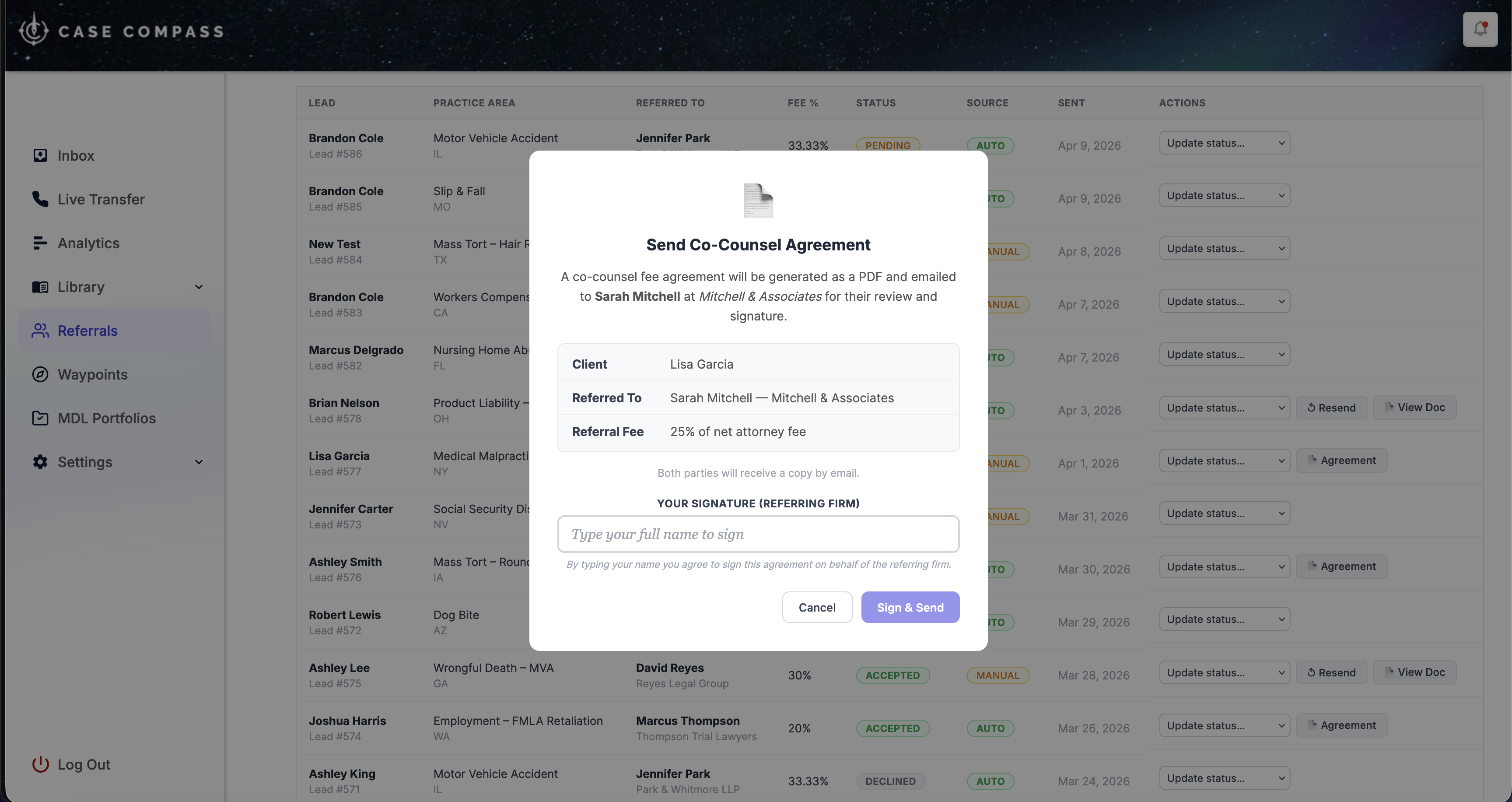
Once a partner accepts an outbound referral, your staff can generate a co-counsel fee agreement as a PDF directly in Case Compass. The referring firm types their name to sign electronically, and the agreement is emailed to the partner. The partner then reviews it in their portal and signs with their own typed signature. Both signed copies are automatically emailed to both parties.
Can I track referral fees automatically?
Yes. Case Compass automatically generates a fee record when an intake from a referral partner completes, and also tracks outbound referral fees when a referred case resolves. You can set fee percentages, mark fees as paid, add notes, and maintain a full ledger — without spreadsheets.
How are referral partners onboarded?
New referral partners receive a secure invitation email with a link to activate their portal and set up their account. The entire onboarding process is self-serve — no credentials to share manually, no back-and-forth. Partners can be activated or deactivated from your dashboard at any time.
Do referring partners see my firm's internal dashboard?
No. Partners have access only to their own branded portal, where they see leads they've submitted, referrals they've received from your firm, and the status of each. They cannot see your internal lead pipeline, other clients' information, or any firm data outside of their own referrals.
What reporting is available for referral partner performance?
The referral reporting dashboard shows leads submitted, intakes completed, conversion rates, and fee totals for every partner — individually and in aggregate. You can identify which partners are sending the highest-quality leads and focus relationship management accordingly.
Does Case Compass support automated referral routing?
Yes. Through Waypoint AI scoring tiers in IntakeOS, cases that meet specific criteria can be automatically routed to partner firms as outbound referrals — without staff intervention. This is ideal for cases outside your practice area or geographic footprint.