December 2025
Lead Scoring for Plaintiff Firms
Dec 4, 2025
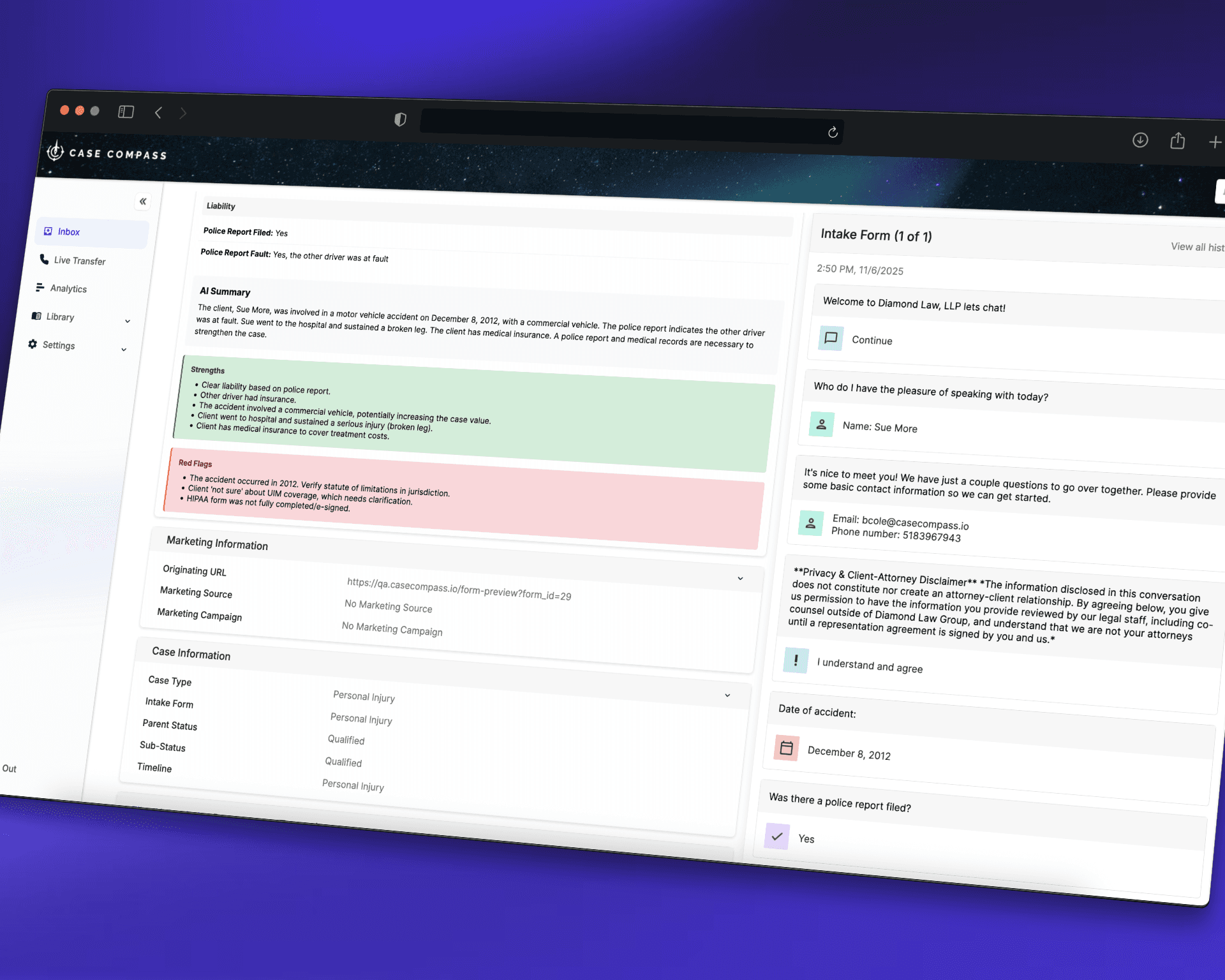
Machine Learning Lead Scoring for Plaintiff Firms: How It Works
This release introduces Machine Learning Lead Scoring to Case Compass, focused on plaintiff, personal injury, and mass tort practices, including Roundup opportunities. Below is a feature level overview that explains how it works in practice.
What Machine Learning Lead Scoring Does
Machine Learning Lead Scoring analyzes new and existing intakes in your Case Compass environment and assigns each lead a score and category, based on factors that matter to plaintiff firms, such as:
Case type: motor vehicle, premises, med mal, product liability, mass tort, and more
Liability indicators: fault, comparative negligence, documentation
Damages: injury severity, treatment, wage loss, long term impact
Coverage and collectability: policy hints, available coverage, defendant profile
Venue and deadlines: jurisdiction, statute related concerns
The result is a ranked list of leads that helps staff focus on high value opportunities first.
How It Works Inside Case Compass
1. Data collection at intake
Machine Learning Lead Scoring uses the information your team already captures in Case Compass:
Web forms and chat intake
Phone intake entered by staff
Structured fields such as incident details, injury information, employment, and exposure history
No separate data entry is required. As soon as the intake is saved, the lead becomes eligible for scoring.
2. Secure machine learning evaluation
Behind the scenes, the machine learning service securely evaluates each lead and generates:
A numeric score that reflects the overall strength and potential value of the case
A case category, for example:
High priority PI
Standard PI
Possible mass tort
Low probability or decline candidate
The scoring logic is tuned for plaintiff work and personal injury patterns, not generic sales leads.
All analysis happens through encrypted, secure channels. Your intake data is never shared with third parties, never used to train external models, and remains fully within your control.
3. Special handling for Roundup and other mass torts
For mass torts, including Roundup, the system looks for specific combinations of:
Work history and occupation
Product or chemical use patterns
Medical conditions that align with known tort criteria
When these signals are present, the lead is tagged as a possible mass tort candidate. Case Compass can then:
Add a Roundup or mass tort flag directly on the lead
Prompt intake staff with additional qualifying questions
Route the lead to a designated mass tort team or attorney queue
This helps your firm avoid missing high value Roundup type opportunities that begin as routine sounding inquiries.
4. Prioritization in your workflows
Once scored, leads can be used throughout Case Compass:
Work queues and call lists: sort by lead score so staff call the best cases first
Attorney review queues: filter to high priority or mass tort flagged leads
Reporting and analytics: compare marketing channels based on average lead score, not only volume
The scoring is visible inside the same Case Compass screens your team already uses, so there is minimal disruption to existing workflows.
Configuration and Controls
You retain control over how Machine Learning Lead Scoring is used in your firm:
Case types: limit scoring to specific case types at first, such as motor vehicle or Roundup related matters
Visibility: choose who can see scores and flags, for example intake only, or intake and attorneys
Workflow rules: decide which scores trigger alerts, escalations, or specific routing rules
Over time, you can expand or refine these settings as your team gains confidence with the scoring output.
Security and Data Handling
Your data security is our top priority:
All scoring requests are transmitted through secure, encrypted channels using industry standard TLS encryption
Only intake data from your Case Compass environment is used for scoring - no external data sources are accessed
Your data is never used to train external models or shared with third parties
Scores and flags are stored securely inside Case Compass and respect your existing user permissions and role based access controls
You bring your own API key (BYOK) - you maintain direct control over the machine learning service and can revoke access at any time
Full audit trails - all scoring activities are logged for compliance and review
No external parties can see your firm specific lead data or results. Your client information stays private and secure.
How To Start Using Machine Learning Lead Scoring
To enable Machine Learning Lead Scoring in your Case Compass account:
Contact your Case Compass representative or support channel to have the feature enabled.
Configure your secure API key for the machine learning service (we will walk you through this).
Select which practice areas and mass torts you want to include initially, such as personal injury and Roundup.
Configure basic queue sorting and visibility options.
Monitor results over the first few weeks, then adjust thresholds, routing, or additional case types as needed.
Once configured, Machine Learning Lead Scoring runs automatically in the background, giving your intake and attorney teams a clearer picture of which leads deserve attention first.
